
Manage and Invoice your Orders
1. Types of Orders
In MyFoodOffice there are three types of orders:
- Order: General orders created manually via the Catalogue or New Order, or imported automatically through third-party integrations.
- Recurring Order: Automated orders generated via the Standard Order Plan.
- Return Order (requires B2B Pro): Orders used to process returns and credit customers up to the original amount received. (This feature must be enabled on the specific Customer Card.)
Note |
Standard orders and Recurring orders are treated identically in your production reports, packing notes, and invoices. |
2. Creating Orders
Orders can be introduced into the system from three primary sources:
- Your Company Account: Created manually by your team.
- The Web Order Portal: Placed directly by invited customers.
- Integrations: Synced automatically from external e-commerce platforms or third-party ordering portals.
3. Setting up Recurring Orders
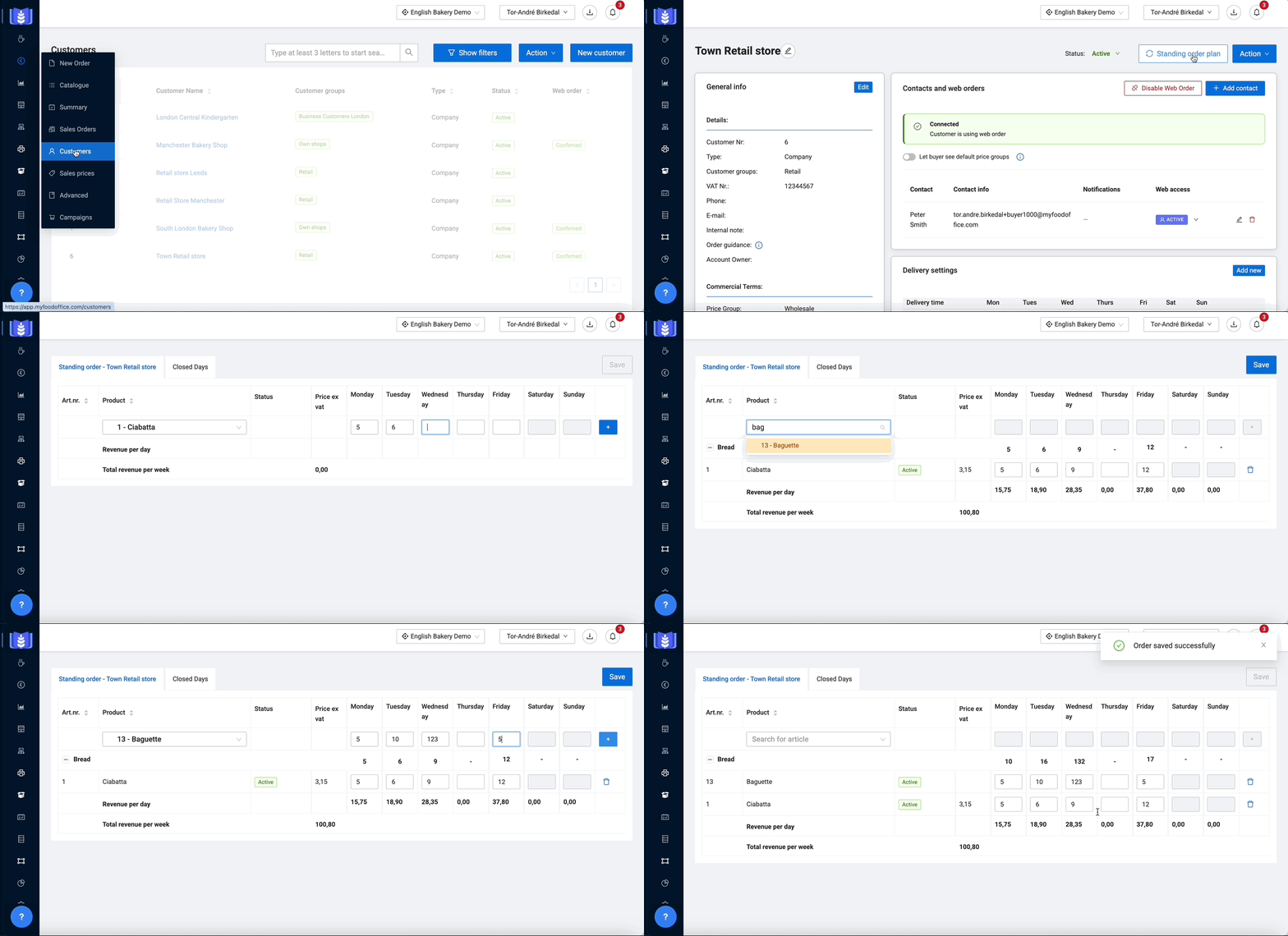
The plan can be modified either from the Customer Card or directly by the customer via the ordering portal.
Further reading: Change your Recurring order for one specific date
Important |
Any changes to a Standard Order Plan must be completed before your company's order deadline (independent of any custom deadlines you have set). |
4. How to invoice Orders (requires Accounting integration)
To invoice, go to Sales orders, click Show filters and make sure you are targetting the desired orders, choose all orders by clicking the upper white checkbox, click Action and Send to invoice.
At them moment of invoicing, you will define two main filters:
Filter | Description | Examples |
|---|---|---|
Invoice interval | How often the customer is invoiced. (This is decided under Invoice settings on the customer card.) | Week, 2 per month, Month |
Delivery date | Choosing the timespan that you are going to invoicing for. | 1st to 30th of March, 5th to 12th of April |
Further reading:
- Manage your Sales Articles
- Understanding Production Reports (article coming soon)
- Setting up and handling Custom orders, eg. special cakes (article coming soon)